
Files and filesystems
Virtual filesystems and how to use them
CheerpJ filesystems are implemented as UNIX-style virtual filesystems with multiple mount points. The folder structure looks like this:
/├── app/├── files/│ ├── downloads/│ └── uploads/└── str/| Mount | Description | Write | Read |
|---|---|---|---|
/app/ | An HTTP-based filesystem for loading files from the web server | No | Yes |
/files/ | A persistent read-write file system (includes /uploads/ and /downloads/) | Java only | Yes |
/str/ | A filesystem for passing JavaScript strings or binary data to Java | JS only | Yes |
| Directory | Description | Write | Read |
|---|---|---|---|
/files/uploads/ | Files uploaded via the window title bar upload button, non persistent | No | Yes |
/files/downloads/ | Files saved here are automatically downloaded to the user’s machine | Java only | Yes |
The uploads and downloads directories are only available in versions CheerpJ 4.3 and higher
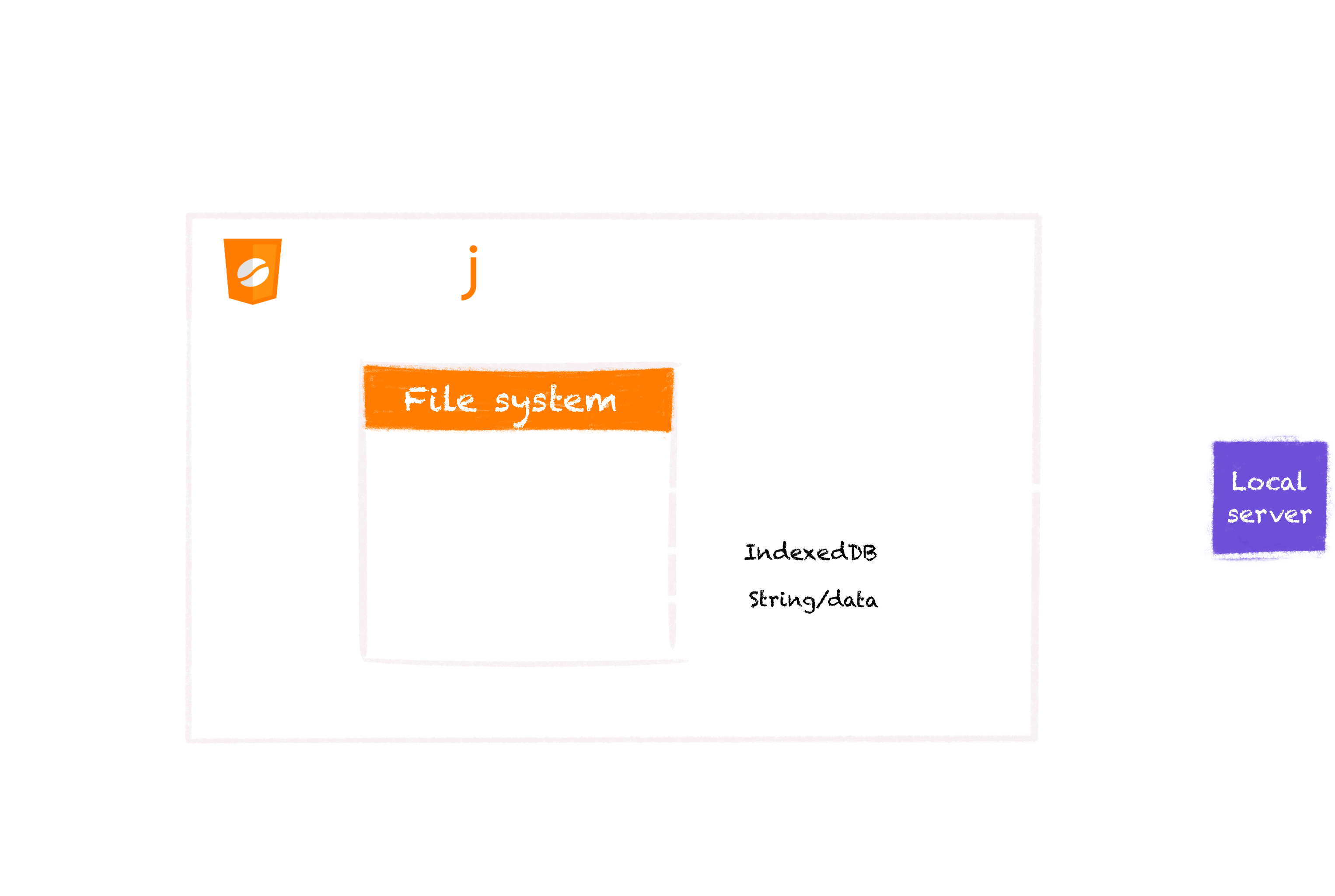
Local filesCheerpJ provides access to a virtualized filesystem, which does not correspond to the local user’s computer. Accessing local files directly is forbidden for browser security reasons.
/app/ mount point

The /app/ mount point corresponds to a virtual read-only, HTTP-based filesystem. /app/ can be used for multiple purposes including accessing JAR files and data from your local server.
The /app/ mount point refers to the root of your web server. When a file is read from /app/, CheerpJ will make an HTTP(S) request to fetch the file.
To have a clearer concept of the /app/ mount point, let’s assume that HTML file with the CheerpJ application is served from the http://127.0.0.1:8080/ origin:
-
/app/example.jarwould be the same ashttp://127.0.0.1:8080/example.jar -
/app/subdirectory/example.txtwould be the same ashttp://127.0.0.1:8080/subdirectory/example.txt
Considering the examples above, to run a JAR with cheerpjRunJar and assuming it is stored in the root of the web server, it should be done as follows:
cheerpjRunJar("/app/my_application_archive.jar");JAR file locationsThe /app/ mount point is the most common location to store the application’s JARs but this is not mandatory. For example, you could write a JAR file into /str/ with JS and then run that.
/files/ mount point
The /files/ mount point corresponds to a virtual read-write, IndexedDB-based filesystem and it is used to store persistent data in the browser client.
Use this for storing data that should persist between sessions, such as user preferences.
Writing files into the /files/ mount point is only possible from inside the Java application. For example:
File file = new File("/files/myfile.ext");OutputStream out = new FileOutputStream(file);out.close();About data persistencyThe data in this mount-point would persist even when closing the application and re-launching it. In the scenario of wiping out the browser’s data or using the browser as “incognito” data will be evicted. This behaviour may vary depending in the browser used among other scenarios.
For more information about browser’s data eviction and persistency please visit this page .
.
Specialized directories
Supported in CheerpJ 4.3 and later versions
Within the /files/ mount point, there are two specialized directories for interacting with the user’s local machine:
/files/uploads/— When a user uploads a file using the upload icon that is present in the title bar of any decorated window in Java (via the upward arrow icon in the title bar), it is automatically placed here and becomes accessible to the Java application. Please note that this directory is not persistent and its contents will be gone upon browser restart.
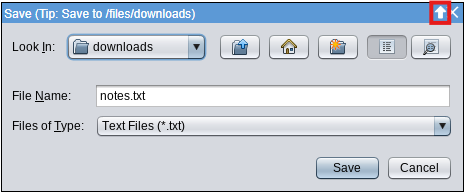
/files/downloads/— Any file written to this directory by the Java application will be automatically downloaded to the default download location of the browser.
/str/ mount point
The /str/ mount point is a simple filesystem that can be populated from JavaScript to share data with Java code. This filesystem is read-only from Java.
Writing files with JavaScript
From JavaScript, it is possible to add files into the filesystem using the cheerpOSAddStringFile API. Example:
cheerpOSAddStringFile("/str/fileName.txt", "Some text in a JS String");Then, you can access this data from Java, for example:
import java.io.FileReader;
...FileReader f = new FileReader("/str/fileName.txt")...
The cheerpOSAddStringFile API can be used with JavaScript Strings or Uint8Arrays. Uint8Arrays may be useful to provide binary data to the Java application. For example, a selected file coming from an HTML5 <input type="file"> tag.
Reading files with JavaScript
To read files from any of the mount-points using JavaScript, you must use the cjFileBlob API as follows:
const blob = await cjFileBlob("/files/myfile.ext");const text = await blob.text();console.log(text);