
Maintain access to existing Java applications while building their replacement
Rewriting a business-critical Java application takes time. During that process, teams still need to support users, maintain access, and keep legacy environments operational. That often means carrying the cost and risk of desktop Java, Citrix, VDI, or ageing deployment models for longer than planned.
CheerpJ allows existing Java applications to run in the browser while a replacement system is developed, helping organisations reduce delivery risk without forcing a big-bang cutover.
Who this solution is for
The problem enterprises face
Rewrites rarely remove legacy risk on day one. In most programmes, the old system must stay operational for longer than expected.
The challenge is not only building the replacement. It is keeping the existing system usable until the replacement is ready.
Where this works best
CheerpJ fits programmes where legacy Java access needs to continue during a phased migration.
This is a transition strategy for legacy Java delivery, not a substitute for the rewrite itself.
The CheerpJ approach
Keep the existing Java application available in the browser while the new system is built in parallel.
Without vs with CheerpJ during a rewrite
Two ways to support users while a Java replacement is being delivered.
CheerpJ reduces delivery pressure by keeping the current application available while the replacement catches up.
What this enables
This is not a replacement for your modernisation strategy. It is a way to execute that strategy with less delivery risk.
Typical deployment model
Architecture overview
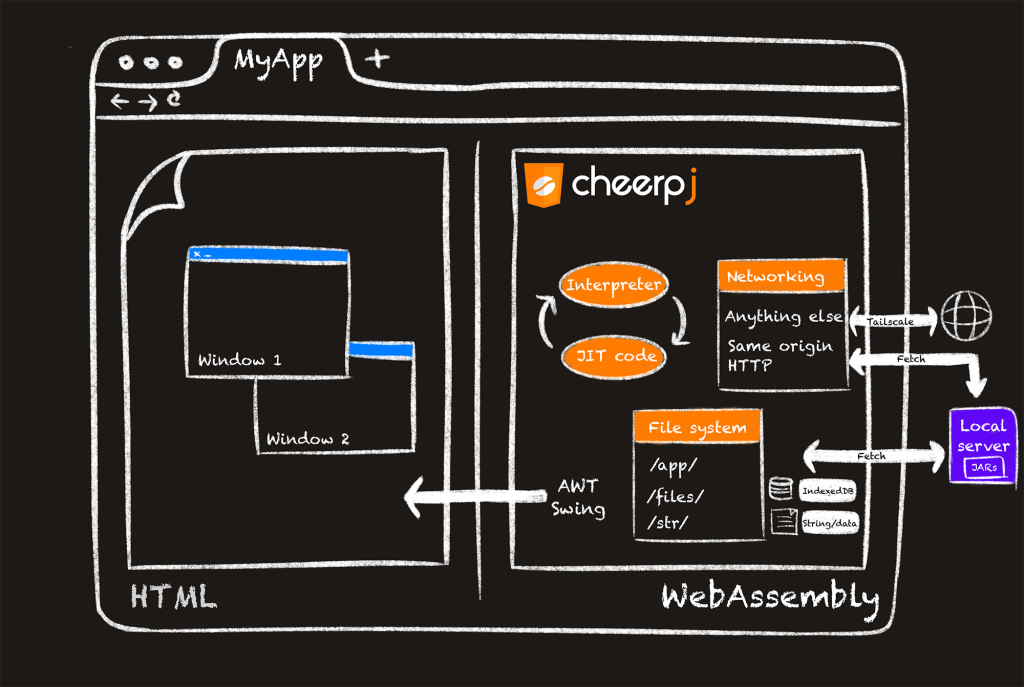
CheerpJ keeps the legacy Java application available in the browser while the replacement application is delivered in parallel.
See how CheerpJ can help maintain access to legacy Java applications while your replacement system is being built.
Book a demo to review your rewrite programme, delivery model, and application compatibility.