Compatibility

What runs in the browser with CheerpJ 4.2, what is fully supported, and how it behaves in enterprise environments.

CheerpJ 4.2 is a full Java Platform for the Web Browser. It includes a Java Virtual Machine, a Java Runtime Environment, and a system virtualization layer, implemented in WebAssembly and JavaScript and built on OpenJDK.

Application Types

✔️ Java Swing applications
✔️ Java AWT applications
✔️ Java Applets
✔️ Java Web Start (JNLP)
✔️ Oracle Forms and Oracle EBS frontends

UI and Graphics

✔️ Standard Swing/AWT widgets
✔️ Multiple windows within the application UI
✔️ Typical enterprise UI workflows (forms, tables, dialogs)

Runtime and Java versions

✔️ 8, 11, 17 (preview)
✔️ Java bytecode execution in the browser
✔️ Full Java runtime delivered client-side (WebAssembly-based)
✔️ Use for long-running applications that are difficult to rewrite

Typical Enterprise Use Cases

Enterprise teams use CheerpJ to modernise and deliver Java applications in browser-native environments.

Modernise Oracle Forms and EBS

Deliver Oracle Forms and Oracle EBS applications in modern browsers without rewriting the frontend.

Replace Java Web Start

Eliminate desktop installs and JNLP distribution.
Run existing applications directly in the browser using standard web deployment.

Replace Java Applets

Replace browser plugins with a browser-native runtime.
Deploy legacy applets as standard web applications without requiring a client-side JVM.

Deliver to Locked-Down Endpoints

Deliver internal Java applications to:

  • Locked-down corporate endpoints

  • Chromebooks

  • Mobile browsers

Without installing a JVM.

Java and Runtime Compatibility

CheerpJ 4.2 provides a browser-based JVM and JRE built on OpenJDK. It executes Java applications at bytecode level without requiring source code changes.

Java Language and Bytecode Compatibility

Java Language Coverage

  • Full Java language compatibility (including reflection and dynamic constructs)

  • Proxy classes

  • Custom class loaders

  • Encrypted and obfuscated bytecode

Application Packaging

  • .jar

  • .war

  • Applets

  • Web Start

Runtime Capabilities in the Browser

Networking

  • HTTP(S)

  • TCP support within browser constraints

File System

  • Virtualised file system

  • Direct access where supported by browser APIs

Desktop Features

  • Clipboard

  • Printing

  • Audio

Typical deployment model

Codebase unchanged

Existing Java application codebase remains unchanged

Runtime in browser

CheerpJ provides the Java runtime inside the browser

Backend unchanged

Backend services and databases remain unchanged

Standard security model

Standard browser security and access controls apply

Deployment options: On-premise or controlled enterprise environments.

Architecture overview
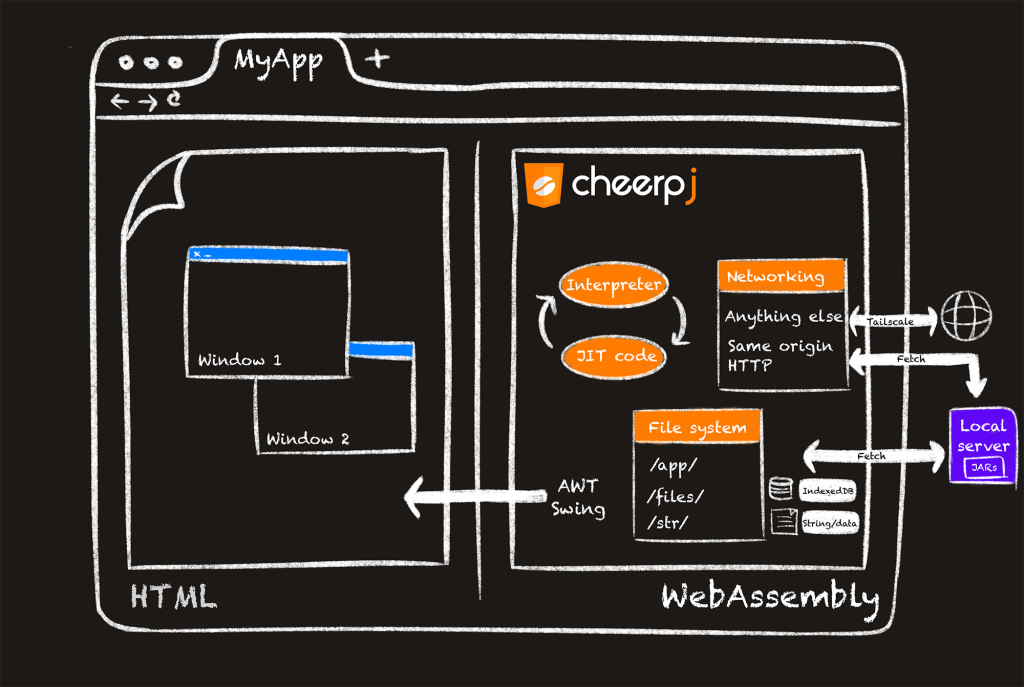
Existing Java applications run unchanged, with CheerpJ providing the Java runtime inside the browser using WebAssembly.

Scenarios That May Require Technical Review

Most enterprise Java applications deploy without modification.

The following integration patterns require architectural review prior to deployment.

Tight operating system integration

Direct process execution, local system services, or OS-level hooks require architectural adjustment.

Extensive JavaFX usage

JavaFX support is partial. Applications heavily dependent on advanced JavaFX features should be reviewed.

Direct hardware access

Access to USB devices, serial ports, smart cards, or proprietary hardware requires integration via web-compatible APIs.

Native binaries or JNI dependencies

Applications that rely on platform-specific native libraries require review to determine a browser-compatible approach.

Custom low-level networking protocols

Applications using non-HTTP protocols or raw socket models may require gateway or proxy adaptation.

Our engineering team can review these patterns and provide a recommended deployment approach.

Detailed Compatibility Specification

The following tables summarise CheerpJ 4.2 compatibility status.
All statuses reflect the current technical datasheet (version 4.2).

1. Java Version Support

Java Version Status Notes
Java 8 Full support Production supported
Java 11 Full support Production supported
Java 17 Partial Production supported
Java 6 Supported via LTS Available on respective LTS versions
Java 7 Supported via LTS Available on respective LTS versions

Support for specific OpenJDK runtime versions is available on request.

2. UI Framework Support

Framework Status Notes
Swing Full support Standard Swing applications supported
AWT Full support Standard AWT widgets supported
JavaFX Partial support Review recommended for advanced JavaFX applications

Limitations – JavaFX

JavaFX support is partial. Applications heavily dependent on advanced JavaFX features or platform-specific rendering behaviour require technical review prior to deployment.

3. Class Library Coverage

CheerpJ executes Java applications at bytecode level and includes a browser-based JVM and JRE built on OpenJDK.

3.1 Java Language and Bytecode

Area Status Notes
Java language compatibility Full support 100% Java language compatibility
Reflection Supported Works without rewrites
Proxy classes Supported
Dynamic constructs Supported
Custom class loaders Supported
Encrypted / obfuscated bytecode Supported

3.2 Core and Runtime Libraries

Library Area Status Notes
Core class libraries Supported Based on OpenJDK
Networking – HTTP(S) Supported Subject to browser security model
Networking – TCP Supported Requires an additional proxy component.
File system – Virtualised Supported Browser-based virtual file system
File system – Direct access Supported Where permitted by browser APIs
Clipboard Supported Via browser APIs
Printing Supported Browser-based printing
Audio Supported

Limitations – Class Libraries

Because CheerpJ runs entirely inside the browser:

  • The Web security model applies.

  • Cross-Origin restrictions apply.

  • Direct operating system access is not available.

  • File system access is subject to browser capabilities.

  • Networking is subject to browser security constraints.

4. JNI and Native Code Support

Area Status Notes
JNI native execution Not supported Native binaries cannot execute inside the browser runtime
Platform-specific native libraries Not supported Requires architectural adaptation

CheerpJ executes Java bytecode in a browser-based JVM implemented in WebAssembly and JavaScript. Native binaries and OS-level libraries are not executable inside the browser environment.

Limitations – Native Integration

Applications that rely on:

  • Platform-specific DLLs / shared objects

  • Direct OS process execution

  • Low-level system hooks

require architectural review and alternative integration patterns.


Browser Support

Browser Status
Chrome Supported
Edge Supported
Chromium-based browsers Supported
Firefox Supported
Safari Supported
Mobile Chrome Supported
Mobile Safari Supported
Mobile Firefox Supported

CheerpJ requires a modern browser with WebAssembly support.

Documentation

For detailed configuration and deployment guidance, refer to:

www.cheerpj.com/docs

Compatibility Assessment

Not sure about your application?

Confirm compatibility for your application.

Submit your application details, and our engineering team will provide a compatibility assessment.

    Leaning Technologies needs the contact information you provide to contact you about our products and services. You may unsubscribe from these communications at any time. For information on how to unsubscribe, as well as our privacy practices and commitment to protecting your privacy, check out our Privacy Policy.